A good Halloween coloring app for iPhone should feel like a small creative room, not a noisy game. Adults often want something more specific than a generic digital coloring library: vintage witches, expressive pumpkins, black cats, moonlit houses, and a visual mood that makes October feel like October. The right iOS coloring book lets you begin quickly, choose colors freely, and return to a favorite scene when you have another quiet minute.
Digital coloring is not a replacement for paper. It is another format with its own strengths. An iPhone fits in a pocket, keeps tools in one place, and makes it easy to color while traveling, waiting, or winding down. Printable pages offer tactile paper, physical materials, and a natural activity for several people around one table. The useful question is not which format wins; it is which one suits this moment.
What makes a good Halloween coloring app?
App Store search results include everything from paint-by-number games to detailed adult coloring books. Their interfaces, art styles, business models, and levels of creative control can be very different. Before downloading, decide what you want from the experience.
- A clear visual identity: the artwork should have a point of view, whether that is cute, gothic, vintage, cozy, or realistic.
- Comfortable controls: color selection, fill, brush, eraser, zoom, and undo should feel easy to find.
- Reliable saving: your work should not disappear when you leave the app or take a break.
- Appropriate pacing: the app should let you color for two minutes or two hours without pressure.
- Transparent access: pricing, subscriptions, and included pages should be explained clearly.
- Respect for attention: fewer interruptions make it easier to enter a relaxing creative rhythm.
These details matter more than a long list of features. A beautiful library is less useful if the app makes it difficult to zoom, undo, or return to a page. A simple interface can be a strength when the artwork and the act of coloring are the focus.
Why adults look for Halloween coloring apps
Halloween has a rare visual range. It can be funny, nostalgic, mysterious, elegant, cozy, or genuinely spooky. Adults may want to revisit the holiday through old-fashioned illustrations, build a seasonal ritual, or simply do something creative after work without preparing a table full of supplies.
An iPhone coloring app is useful when the available time is short. You can color one pumpkin while waiting for an appointment, add a few shadows before bed, or explore a palette during a train ride. The small screen also encourages a focused frame: one illustration, one tool, one next decision.
For a longer evening, an iPad can provide a larger canvas while keeping the same digital workflow. If you prefer paper, compare the experience with our guide to online, printable, and app-based Halloween coloring.
Digital coloring versus printable Halloween pages
Both formats can be relaxing, but they solve different practical problems. A printable page is easy to share with children, friends, students, or guests. A digital app is easier to carry and does not require a printer, paper, or a box of pencils.
| Choose an iPhone app when you want | Choose printable pages when you want |
|---|---|
| Portable coloring anywhere | A tactile paper activity |
| Undo, erase, and easy palette changes | Markers, crayons, or colored pencils |
| No preparation or cleanup | A group table activity |
| Quick sessions between other tasks | Cards, crafts, and wall displays |
| One compact library in your pocket | Large pages and physical keepsakes |
There is no need to choose permanently. Many people use paper for a family activity and a coloring app for personal quiet time. A digital page can also help you test a color palette before using it on a printed illustration. Our printable PDF guide covers the paper side in more detail.
What to look for in Halloween artwork
The art is the reason to return. Generic seasonal icons may be enough for a quick activity, but adults often stay with an app when the illustrations create a world. Look for expressive characters, a consistent line style, and scenes that reward a closer look.
Vintage witches and storybook scenes
Witches can be playful, elegant, mysterious, or warm. A broomstick, spell book, cat, or crooked cottage gives the colorist several visual anchors. Our guide to Halloween coloring pages for teens and adults explores how subject matter can feel more grown-up without becoming bleak.
Pumpkins and harvest landscapes
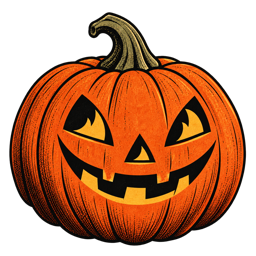
Pumpkins are excellent for short sessions because they have clear sections and natural color variations. A larger harvest scene can support a longer evening with leaves, fences, fields, windows, and distant hills. For palette ideas, read our pumpkin and jack-o-lantern guide.
Black cats and moonlight
A black cat creates a strong silhouette, while the sky and small details carry the color. Try plum shadows, muted gold stars, deep teal, or a warm window behind the cat. The illustration can stay simple or become a detailed study in contrast.
Ghosts, skeletons, and cozy spooky details
Not every adult wants horror. Friendly ghosts, dancing skeletons, old paper texture, and humorous details can make the page feel nostalgic rather than intense. Our kawaii Halloween coloring guide is useful when you prefer a softer, playful mood.
Freeform coloring or color by number?
Color-by-number apps provide a clear instruction system: match the number to the color and reveal the picture. They can be satisfying when you want immediate structure and a predictable result. Freeform coloring gives you more authorship. You choose the palette, decide where shadows go, and can make the same line art look completely different on another day.
Neither style is more creative for every person. Color-by-number can be a gentle way to begin when decision-making feels tiring. Freeform tools suit colorists who enjoy experimentation, mood, and personal interpretation. Check the app description and screenshots so you know which kind of control you are downloading.
Vintage Halloween Coloring is built around the freeform side of the experience: choose a scene, select a color, and make the illustration your own. The artwork provides a starting point, not a required answer.
Make a quiet iPhone coloring ritual
A relaxing app experience depends on the setting as much as the software. You do not need a perfect room or an elaborate routine. A few small choices can signal that this is time for attention rather than scrolling.
- Choose one page: avoid browsing indefinitely; pick a scene that gives you a clear feeling.
- Limit the palette: start with three to five colors and add more only when needed.
- Lower interruptions: use Focus mode or silence notifications if that helps.
- Color one area: a pumpkin, hat, window, or moon is enough for a short session.
- Stop naturally: save the page when the moment feels complete, even if the picture is unfinished.
For ideas beyond the screen, read how to make a quiet coloring ritual for autumn evenings and our guide to Halloween coloring for stress relief. The same principle applies: make the activity easy to begin and easy to leave.
Color palettes for a digital Halloween page
Digital tools make it easy to test a mood without wasting paper or mixing a new set of materials. Try a restricted palette first. A vintage combination might use parchment, burnt orange, dusty teal, dark brown, and muted rose. A midnight palette could use plum, navy, lavender, pale yellow, and charcoal.
Use one color as an anchor and one as a small surprise. For example, keep the witch’s dress and sky restrained, then add a bright coral ribbon or a warm gold window. Repeated accents help the picture feel intentional. Our article on Halloween coloring book color palettes includes pumpkin, midnight, and vintage approaches.
Do not worry about realism. A digital coloring page is a place to try a green moon, blue pumpkins, or a pink ghost. If the result does not work, undo it and try again. That freedom is one of the strongest reasons to choose an app.
How to compare iOS coloring apps before downloading
Search results can make every coloring app sound similar. Read the App Store listing with a few practical questions in mind:
- Does the app run on the iPhone or iPad you use?
- Is the art style clearly visible in the screenshots?
- Does it offer freeform tools, color-by-number, or both?
- Can you save or revisit completed artwork?
- Are subscriptions or in-app purchases explained before download?
- Does the age rating fit your intended audience?
- Does the app promise a focused experience or mainly a game loop?
Independent roundups often compare adult coloring apps by brush control, Apple Pencil support, offline access, ads, subscriptions, and library size. Those comparisons are useful, but the best app still depends on the artwork and rhythm you prefer. A giant library is not automatically better than a small, coherent collection.
Meet Vintage Halloween Coloring for iPhone
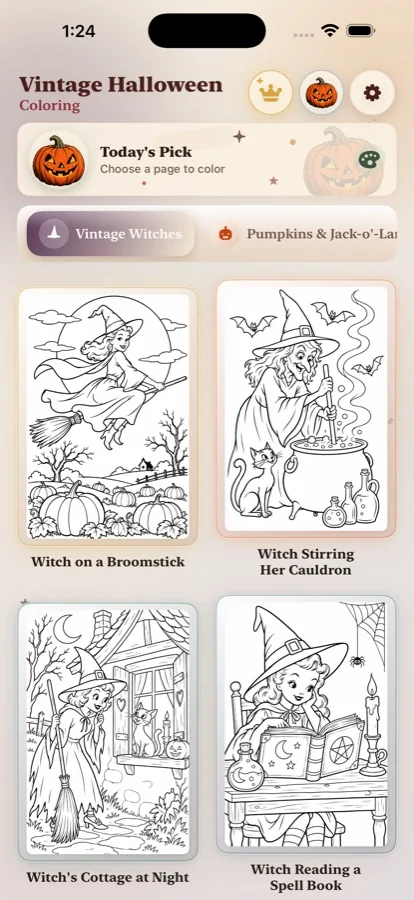
Vintage Halloween Coloring is a dedicated Halloween coloring book for people who still love the warmth and mystery of the season. It focuses on nostalgic scenes: witches, broomsticks, pumpkins, black cats, ghosts, cottages, moonlight, and the little details that make an illustration feel collected rather than generic.
The app is designed for a slower kind of digital coloring. Open a page, choose a color, and build the mood at your own pace. You can use it for a few minutes between tasks or settle into a longer autumn evening. The iPhone format keeps the collection close without asking you to prepare paper, sharpen pencils, or clear a table.
When you are ready to try it, download Vintage Halloween Coloring from the App Store. The official page is the best place to check current availability, compatibility, pricing, and app details.
Use the app alongside paper coloring
A digital Halloween coloring app and a printable page can support each other. Use the app to explore a palette, then bring the same colors to a paper scene. Or use a printable activity with children while you color a personal page on your iPhone. The two formats do not need to compete.
Paper is especially useful for parties, classrooms, and crafts. Digital coloring is useful for travel, quiet breaks, and adults who want to keep a project private and portable. Our guides to classroom coloring, party coloring activities, and coloring with writing prompts can help you choose a physical activity for the same seasonal mood.
A better way to choose your next Halloween coloring app
Start with the feeling you want. If you want a structured puzzle, look for color-by-number. If you want a digital pencil case, choose freeform tools. If you want a calm adult activity, prioritize artwork, pacing, saving, and a readable interface over a noisy list of features.
Then choose an image that makes you want to begin. A good Halloween coloring app should create a small pull toward the page: the crooked house, the orange pumpkin, the cat under the moon, or the witch flying across the quiet sky. The first tap should feel like opening a book.
Vintage Halloween Coloring is made for that moment. It is a Halloween coloring app for iPhone and a pocket-sized retro coloring book for adults who want to keep a little room for wonder. Download it on the App Store, choose a page, and let the season take shape one color at a time.
Frequently asked questions
What should I look for in a Halloween coloring app for iPhone?
Look for artwork that matches your taste, comfortable zoom and color controls, undo and erase options, reliable saving, clear pricing, and a readable interface.
Is a digital app better than printable pages?
Neither format is universally better. An iPhone app is portable and keeps tools together, while printable pages offer paper texture and easy group use.
Can adults use a Halloween coloring app?
Yes. Adults often prefer detailed seasonal artwork, nostalgic scenes, limited palettes, and a quiet creative activity.
Where can I download Vintage Halloween Coloring?
Download it for iPhone from the official App Store page.