When people search for Halloween coloring pages online, they may be looking for several different things. They may want to color directly in a browser, download a printable PDF, find a digital app for an iPhone or iPad, or simply browse a large collection before choosing a favorite image. These formats overlap, but each one creates a different kind of creative experience.
Printable pages are tactile and easy to share. Online coloring is immediate and requires no paper. A digital app adds portability, zoom, undo, and saved palettes. The best choice depends on where you are, who is coloring, and whether you want a screen-free activity, a quick experiment, or a more immersive collection of seasonal artwork.
What does “Halloween coloring pages online” mean?
Online Halloween coloring usually refers to artwork that can be opened and colored in a browser or digital tool. Some websites offer a simple color-fill experience. Others let you draw with a mouse, stylus, or touch screen. Many collections also use “online” to mean that you can view the page, download it, or print it from the same screen.
Before choosing a page, look for the action you actually want:
- Color online: useful when you want to start immediately without downloading or preparing supplies.
- Download PDF: useful when you want to print the same page more than once or save it for later.
- Download PNG: useful for digital drawing apps, presentations, crafts, or custom layouts.
- Use an iOS app: useful when you want a portable library, zoom controls, undo, saved work, and a more focused coloring experience.
Large collections often include several of these choices. For example, ColoringHub combines printable pages with online coloring, while DrawAlong combines printables with drawing and tracing activities. The format label matters because it tells you what will happen after you click.
When printable Halloween coloring pages are the better choice
Paper works especially well when coloring is part of a shared activity. A family can sit around one table. A teacher can put pages at a classroom center. A library can display finished artwork. A child can use crayons without worrying about a battery, login, or fragile screen.
Printable pages are also useful when you want to create something physical. A colored pumpkin can become a gift tag. A ghost can become a garland. A detailed witch can be framed. Read how to turn Halloween coloring pages into crafts and decorations for more ideas.
Paper offers a different kind of attention. The size of the page stays constant, the tools are visible on the table, and the result can be placed on a refrigerator or wall. For some colorists, that physical progress is exactly what makes the session feel satisfying.
When online or digital coloring makes more sense
Digital coloring is convenient when you have limited space, no printer, or only a few minutes. It is also helpful while traveling, waiting, or relaxing somewhere away from home. A phone or tablet can hold many pages without a folder, pencil case, or stack of paper.
Digital tools offer controls that paper cannot:
- Undo: try a color without worrying that one choice will ruin the page.
- Zoom: work on small details even when the original image is dense.
- Save versions: keep a bright autumn palette and a darker moonlit version of the same scene.
- Reuse colors: build a consistent palette across several illustrations.
- Reduce setup: start a short session without arranging a table full of supplies.
Digital coloring can still feel slow and creative. The screen is simply the surface. Choose a comfortable brightness, silence unnecessary notifications, and treat the page as the center of attention.
Printable PDF, online browser, or iOS app?
Here is a simple way to decide:
- Choose a printable PDF for a classroom, family table, party, craft project, or screen-free evening.
- Choose browser coloring for an immediate, low-commitment activity when you want to try a page before saving it.
- Choose an iOS app for a portable collection, repeated sessions, zoom, undo, and saving finished work.
You do not have to choose one format forever. A child may color a pumpkin on paper and use a tablet for a witch scene. An adult may print a favorite page for a gift and use the app during a commute. Format should serve the creative moment, not define it.
How to choose a good online Halloween coloring page
The format is only half of the experience. The artwork still needs to be worth coloring. Look for a clear focal point, expressive line art, and a subject that matches the age and mood of the person using it.
For younger children, choose friendly ghosts, pumpkins, cats, bats, and big open shapes. For elementary children, choose costumes, haunted houses, pumpkin patches, and trick-or-treat scenes. Teens and adults may prefer layered backgrounds, vintage witches, spell books, moonlit cottages, or more detailed patterns.
A useful collection should make the difficulty visible. If every thumbnail looks equally dense, it can be difficult to choose. Our guide to easy Halloween coloring pages for beginners explains why bold outlines and open areas can make a first session more enjoyable. For a more detailed age-inclusive style, see Halloween coloring pages for teens and adults.
How to print an online Halloween coloring page well
When you decide to move from screen to paper, start with the file rather than a screenshot. A PDF or high-resolution PNG usually prints more clearly than a small preview image. Check whether the page is formatted for US Letter, A4, or another size.
Use fit-to-page when the proportions of the artwork and paper do not match. Print one test page and check the margins, line contrast, and scale. If the image looks too small, choose portrait orientation or print one page per sheet. For a smaller activity card, print multiple pages per sheet only when the lines remain easy to see.
Our Halloween coloring pages printable PDF guide covers paper, margins, and printer settings in detail. For crafts, heavier paper or cardstock will hold up better than thin copy paper.
Online coloring for adults
Adults often use online coloring for a quick creative reset. The advantage is not that the page is easier; it is that the experience is available immediately. A detailed haunted house, witch, or pumpkin field can be opened during a short break and continued later.
Choose an interface that does not fight the artwork. Useful controls should be easy to find, colors should be easy to compare, and the page should remain readable when zoomed. A restrained palette can keep the result atmospheric. Try rust and parchment for a vintage look, midnight blue and gold for moonlight, or plum and teal for a more unusual Halloween mood.
Read Halloween coloring for stress relief for ideas about pace, attention, and making coloring part of a calmer routine.
Halloween coloring on iPhone and iPad
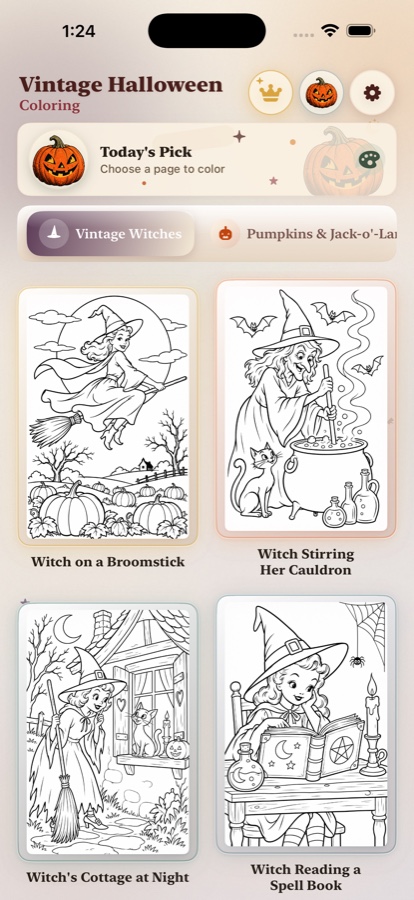
An iPhone or iPad is useful when you want a personal collection that travels with you. Touch controls make it easy to explore a page, while zoom helps with small areas. Undo makes experimentation feel safe, which can be especially helpful when trying a palette that is outside the usual orange-and-black tradition.
The Vintage Halloween Coloring iOS app is designed around nostalgic Halloween illustrations, expressive scenes, and freeform color choices. Use it for a quiet evening, a creative break, or a portable activity when bringing paper and supplies is inconvenient.
Digital does not have to mean rushed. Put the phone on Do Not Disturb, use a stylus if you enjoy more control, and let one page take as long as it needs. The app can also complement a paper routine: print a favorite finished scene or use the digital version to test colors before beginning on paper.
Online coloring for families and classrooms
For a family, online coloring can be a useful option when several people want different levels of detail. One person can use a simple browser page while another chooses a more detailed iPad scene. If screen time is limited, set a short timer and finish by discussing the colors and subjects each person chose.
In a classroom, digital coloring works best when the activity has a clear boundary. Choose one page, one palette prompt, or one short session. A teacher can ask students to create a warm version and a cool version of the same scene, then compare how the mood changes.
Printable pages remain useful for the group display. Students can color digitally first, then use the result as inspiration for a paper version or a written description. The two formats can support each other instead of competing.
Keep digital coloring accessible and comfortable
Digital coloring should be easy to see and easy to stop. Adjust the screen brightness to the room, use a larger device when a page is detailed, and take breaks. Make sure important controls are not hidden behind tiny icons if the activity is being used by a young child or older adult.
For people who prefer larger shapes, select simple artwork or use zoom. For people who enjoy detail, choose a scene with enough layers to reward a longer session. The best digital page is one that matches the colorist's comfort rather than forcing everyone into the same level of challenge.
Online Halloween coloring and creative ownership
Before downloading or sharing an image, check the site's usage terms. Some pages are for personal use only. Others allow classroom or homeschool printing. If you are making cards, decorations, or social posts, confirm whether the artwork can be reused outside the original activity.
When you create a finished digital image, keep a personal copy and note the date. A folder of Halloween coloring experiments can become a seasonal visual journal. You may notice that your palette changes from bright orange and purple to muted rust and midnight blue over time.
A simple online-to-paper Halloween ritual
Start by browsing a few images online without choosing immediately. Save one page that feels easy and one that feels interesting. Color the easy page digitally to test a palette. If you love the result, print the second page and use the same colors on paper.
Finish by placing the paper page beside the device. Notice what changed. The digital version may have cleaner fills, while the paper version may have more texture and visible hand movement. Neither is more correct. They are two records of the same creative decision.
Final thoughts
Halloween coloring pages online are not a replacement for printable pages, and printable pages are not a replacement for digital coloring. Each format offers a different kind of invitation. Paper asks you to slow down with physical tools. A browser lets you begin instantly. An iOS app gives you a portable studio with room to undo, zoom, and experiment.
Choose the format that fits the moment. Print a pumpkin for the family table. Color a witch on your iPad while traveling. Try a friendly ghost online before deciding whether it belongs in a Halloween garland. The important thing is not where the color goes first, but whether the page gives you a pleasant reason to keep going.
Frequently asked questions about online Halloween coloring
Are online or printable Halloween coloring pages better?
It depends on the setting. Printable pages are best for screen-free family and classroom activities, while online or digital coloring is convenient for travel, quick sessions, easy undo, and experimenting with color.
Can I color Halloween pages online on an iPhone?
Yes. A digital coloring app can make Halloween artwork portable and lets you zoom, test colors, undo choices, and save finished pages on an iPhone or iPad.
What should I check before printing Halloween coloring pages?
Check the paper size, image resolution, margins, line contrast, and whether the page is intended for US Letter or A4. Use fit-to-page when the paper and artwork proportions differ.
Are digital Halloween coloring pages good for adults?
Yes. Adults may enjoy digital coloring for its portability, flexible palettes, zoom controls, and easy experimentation. Detailed vintage, cozy, and spooky scenes can all work well on a tablet or phone.